
Adblock Plus delivers a faster, cleaner, and more private browsing experience by blocking intrusive ads and trackers before they ever reach your screen. Designed for a seamless out-of-the-box experience, it provides immediate protection with no complicated setup required. As the world’s most downloaded ad blocker, Adblock Plus empowers you with a user-controlled standard that keeps the web open, uncluttered, and exactly how you want it.
How do I get started using Adblock Plus?
Getting started with Adblock Plus is simple! Just follow these steps:
Step 1: Download the world’s most popular ad blocker
To begin, visit adblockplus.org and click Get Adblock Plus. Our site automatically identifies the right version for your browser, providing automatic protection as soon as the download finishes. For a complete list of supported browsers and more detailed guidance, visit our guide: How to download and install Adblock Plus.
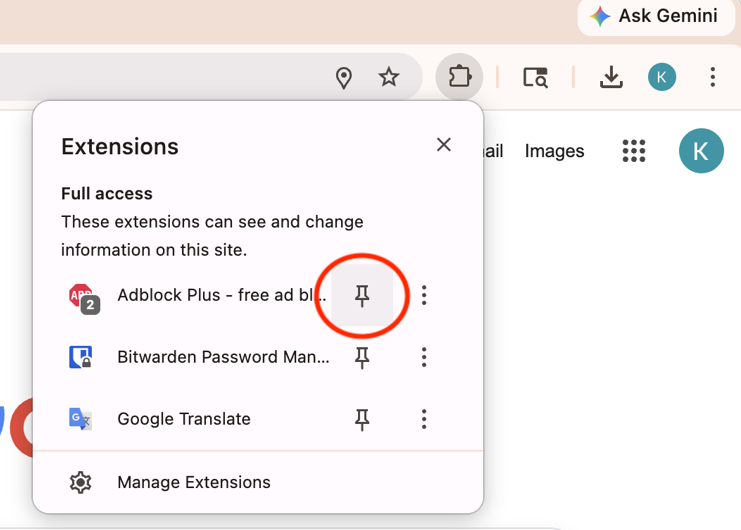
Step 2: Access your controls instantly
For easy access pin the Adblock Plus icon to your desktop browser toolbar: Hide or show the Adblock Plus icon on your browser's toolbar.
Step 3: Personalize your browsing experience
Adblock Plus provides immediate protection the moment it's installed, though you have full control to customize your experience. Below are the most popular ways to adjust your settings and manage how you interact with the web:
-
Support a sustainable web: By default, Adblock Plus allows a small number of non-intrusive ads to help content creators stay in business. You have 100% control and can disable this feature at any time to block all ads: How can I customize my ad-blocking experience?
-
Empower your favorite creators: If you want to support a specific website, you can easily set Adblock Plus to remain inactive on that domain: Add a site to your allowlist.
-
Custom element blocking: You have the final word on what appears on your screen; use our tool to manually block any specific part of a page that you find distracting: Block a specific element.
Step 4 (Optional): Enhance your experience with Premium
Adblock Plus Premium offers advanced features designed to give you even more control over your digital environment. From blocking additional distractions to further customizing your view, Premium puts you in charge of your browsing experience: All about Adblock Plus Premium.
Already have a subscription? To get started with your existing features, please see this guide: Unlock Adblock Plus Premium.
Do I need to configure Adblock Plus?
No. Adblock Plus works immediately upon installation without requiring complex manual setup.
Is Adblock Plus compatible with the latest browser standards (Manifest V3)?
Yes. Adblock Plus is fully optimized for Chrome’s Manifest V3. This ensures that your ad-blocking experience remains seamless and high-performing as browser technologies evolve.
More questions?
If you have any questions or need personalized help, we're just an email away: Submit a ticket.