The Premium upgrade is available on Adblock Plus for Chrome, Edge, Firefox, and Opera browsers, as well as the Adblock Plus for iOS app. Learn more: All about Adblock Plus Premium.
Why block cookie notices?
Many users have reached out to us over the years about distracting cookie pop-ups like this:

Although cookies have become an important part of modern browsers, we know these banners interrupt your browsing and can be an annoyance. With the block cookie consents feature, you'll be able to browse any website without ever seeing these annoying cookie notifications.
Does this mean I'm consenting to cookies?
Blocking the cookie consent notification means the pop-up will be hidden. We’ll reject any cookies we can on your behalf, and only accept those that are required to access the website. To learn more about cookies and how they work, check out our blog post.
You can opt out of cookie blocking at any time by disabling the feature.
Enable Block cookie consent pop-ups
Haven't yet purchased Premium? Get Adblock Plus Premium.
If you've already paid, make sure you've unlocked your Premium upgrade.
-
Click on the ABP icon on your browser's toolbar. If you don’t see the icon, be sure to pin it.
-
Click the gear icon.
-
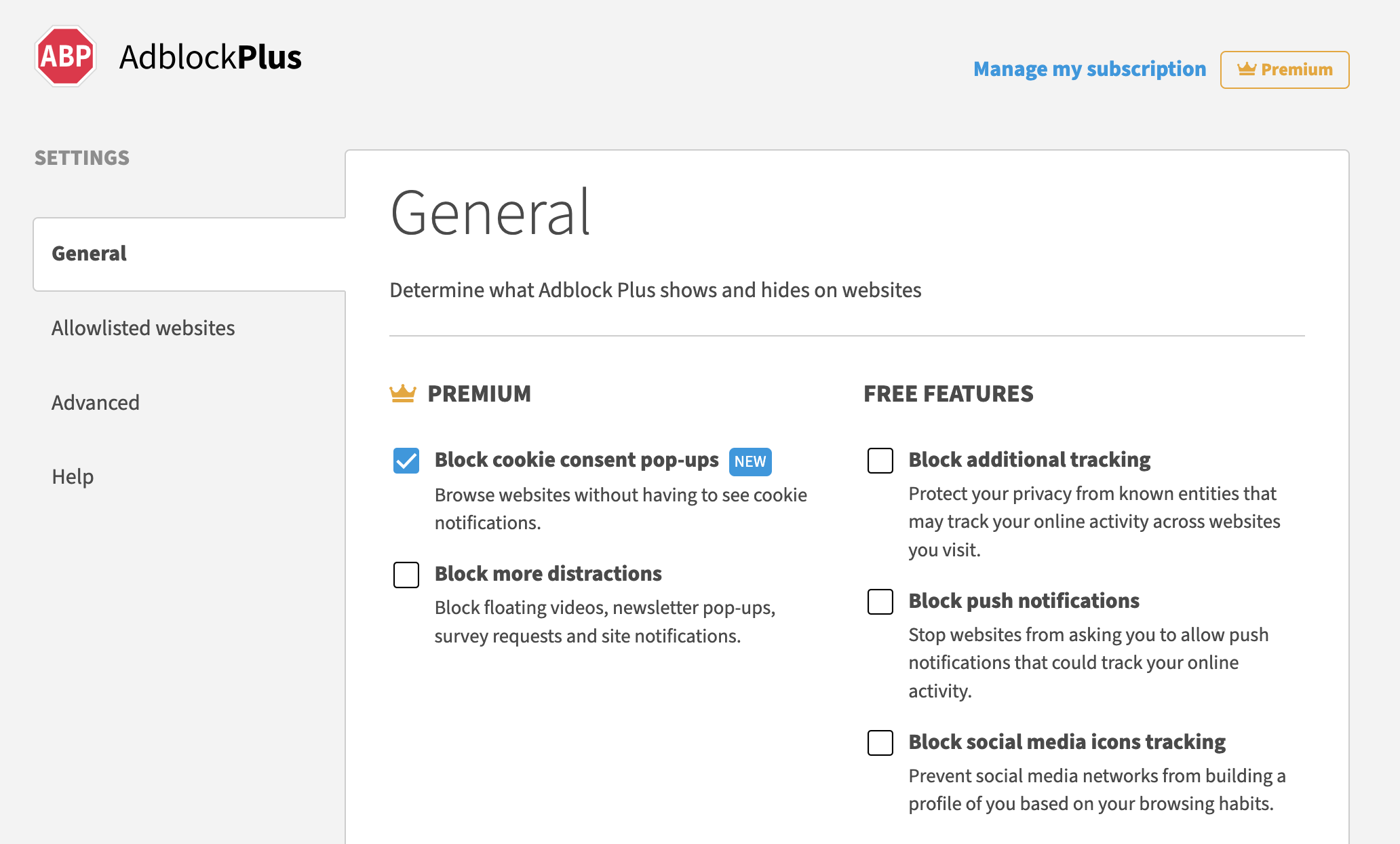
On the General tab, select Block cookie consent pop-ups.
-
Click Ok, got it on the dialogue box that appears.